Larry OG Smoke Shop
A WooCommerce retail storefront customized through an Eldy child theme, with variation-aware catalog presentation, AI-assisted product content workflows, and project-specific Clover and delivery tooling.
PROJECT VISUALS / 01
Visual explorer
Scroll or swipe thumbnails to browse
01 / OVERVIEW
Project overview
Larry OG Smoke Shop is a client WooCommerce storefront built on the Eldy parent theme and a dedicated child theme. The local project source contains custom archive and variable-product presentation, WooCommerce template overrides, and separate plugin codebases for AI-assisted catalog content, Clover catalog administration, and delivery coordination. This case study describes inspected local source, not a verified current production runtime.
02 / PROJECT SNAPSHOT
At a glance
- Project type
- Client project
- Category
- WordPress · WooCommerce · Custom Plugin Development · Theme Engineering · API Integrations
- Status
- In development
03 / ROLE & CONTRIBUTION
My role
My documented project work covers WordPress and WooCommerce storefront engineering, including the Eldy child theme and catalog presentation. The local source also contains project-specific plugin code; its headers do not establish my individual contribution to every plugin workflow.
- Customized the Eldy child theme with project-specific PHP, storefront CSS, and front-end JavaScript.
- Built grid and list archive presentation for WooCommerce products, including variation attribute thumbnails and stock or preorder labels.
- Added archive variation-image selection and pointer-driven product-image swapping for catalog cards.
- Adjusted variable-product price presentation by context and customized the variable add-to-cart template to display selected variation information.
- Added WooCommerce template overrides for product loops, variable add-to-cart, loop add-to-cart, the mini-cart, and checkout.
04 / CUSTOM PLUGIN DEVELOPMENT
Custom plugin development
Standalone WordPress extensions documented from the available project source.
QB AI Content Generator
Provide one WooCommerce-aware plugin with three AI-assisted catalog workflows: product descriptions, variation descriptions, and product-image metadata, using the OpenAI API.
Workflows
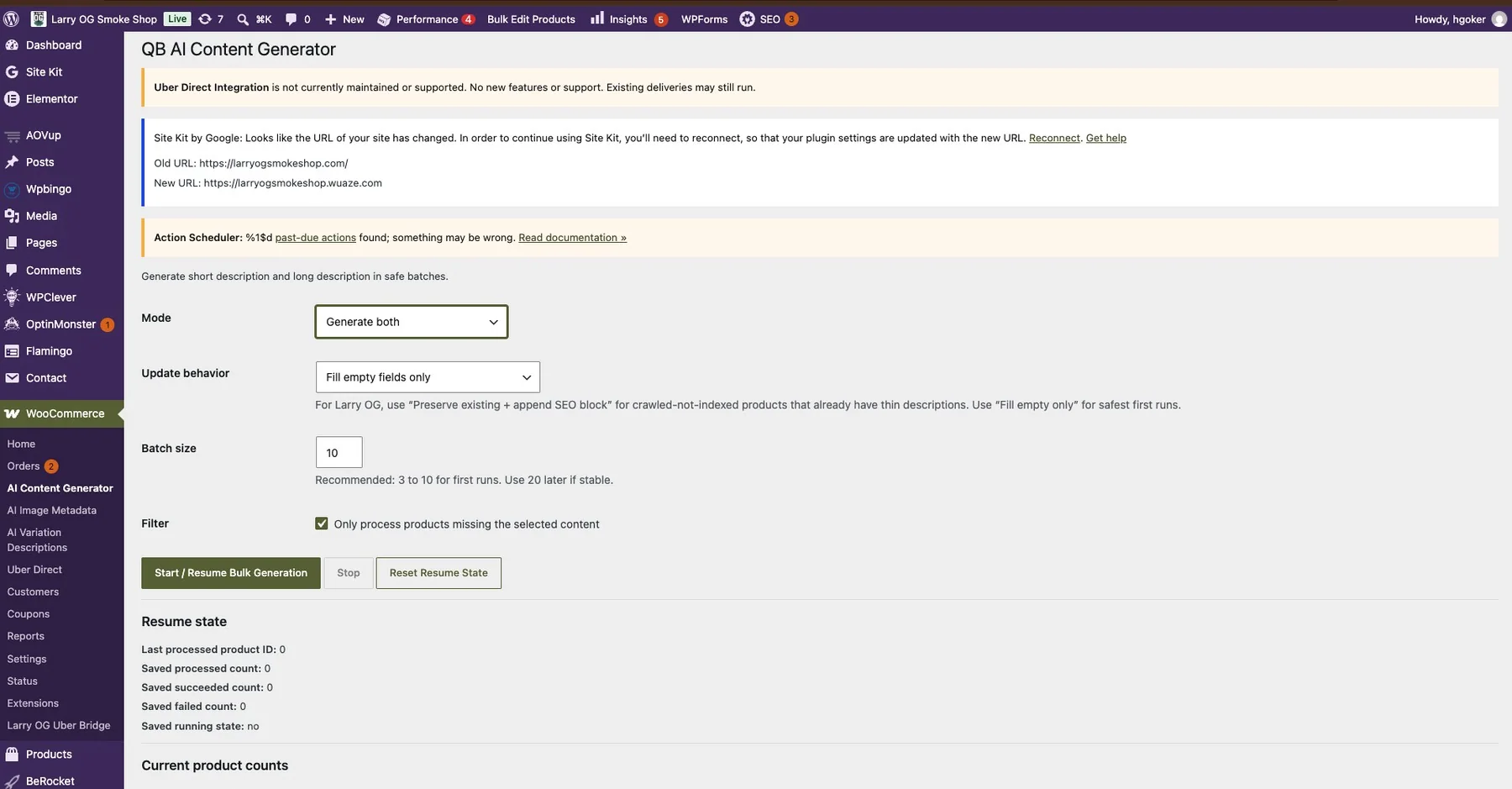
- Embeds individual parent-product copy controls in the WooCommerce product editor and also provides a bulk product-content screen. Copy can be generated for short descriptions, long descriptions, or both; update modes preserve existing copy while appending a managed SEO block, fill empty fields, replace selected fields, or preview without saving.
- Provides individual variation-description generation in the product editor and a separate bulk screen that processes variable parent products. Bulk controls include a missing-description filter, batch size, start/resume, stop, reset, progress counts, and a recent batch log. Modes fill empty descriptions, append to existing copy, or replace it.
- Provides individual and bulk image-metadata generation for alt text, title, caption, and description. The bulk screen can target featured images, gallery images, or both, process batches, resume progress, and limit updates to currently empty fields.
- Sends server-side requests to the OpenAI Responses API. Product and variation text updates have source-level backup helpers; image metadata updates do not show the same preview or backup flow in the inspected source.
Implementation
- The three workflow interfaces are modules in one separately installed plugin, not three plugin packages: a WooCommerce product-editor meta box plus separate content, variation, and image-metadata administration screens.
- Bulk resume state, including last processed IDs and progress counters, is persisted in dedicated WordPress options. The source registers authenticated AJAX actions with capability checks and nonce verification.
- The plugin uses the OpenAI Responses API endpoint. Its model defaults to gpt-4o-mini and can be overridden with QB_OPENAI_MODEL; the API key is read server-side from OPENAI_API_KEY.
Integrations
- WooCommerce product and variation editing.
- OpenAI Responses API.
Scroll or swipe thumbnails to browse
CLOVER APPS
Provide review-led Clover catalog comparison and WooCommerce product administration tools.
Workflows
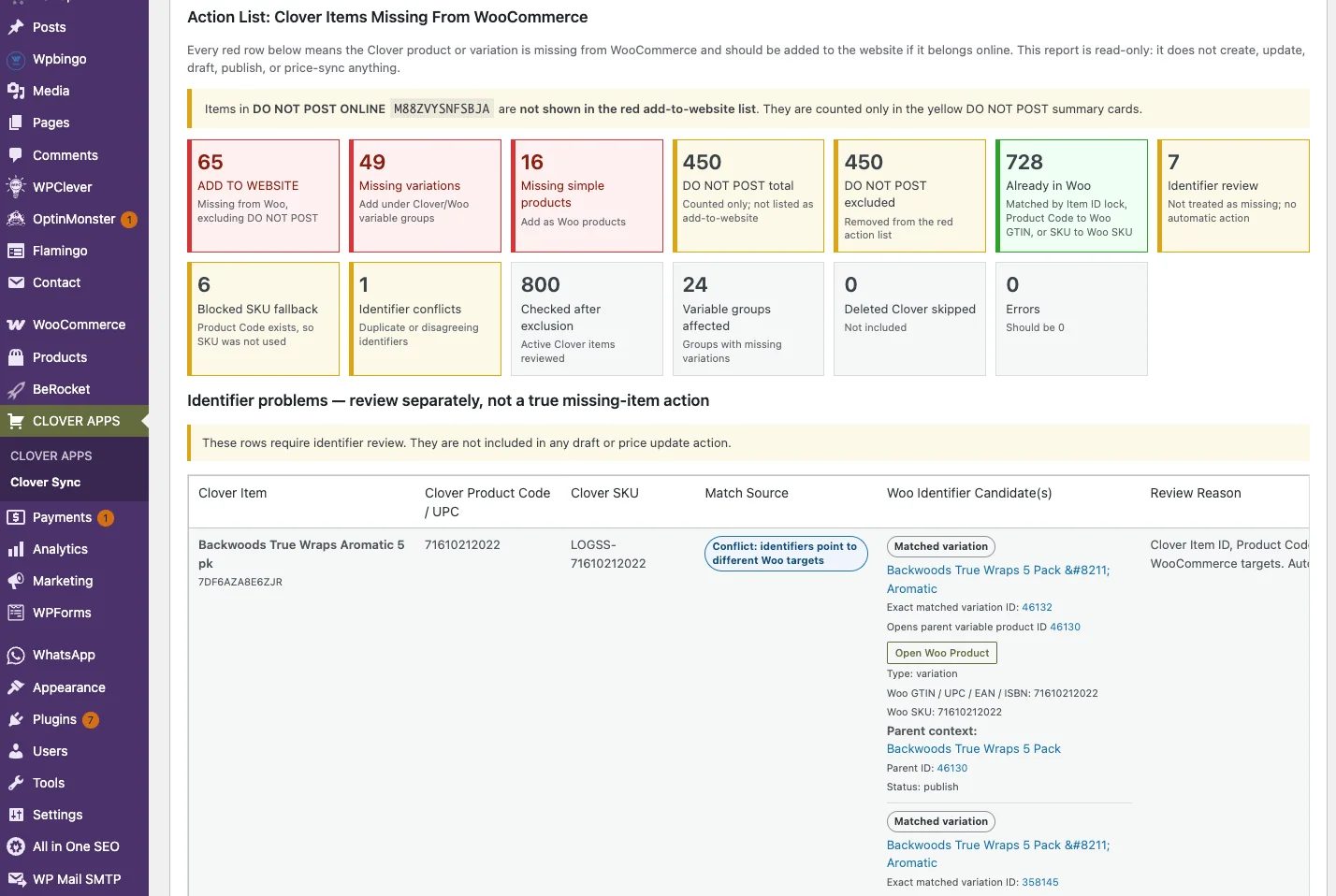
- Fetches Clover catalog items and compares them with WooCommerce products and variations.
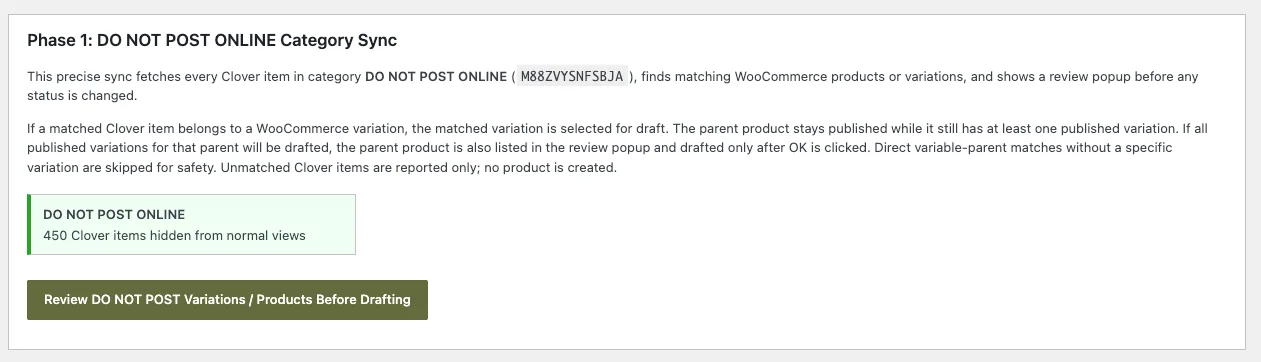
- Provides a preview before applying protected-category status changes, price updates, or missing-SKU backfills.
- Reports Clover items that are not matched to WooCommerce; the source describes this report as read-only and does not create products from it.
Implementation
- Implemented as a separate WordPress plugin with a WooCommerce administration screen and authenticated admin AJAX workflows.
- The source separates preview actions from apply actions for the documented catalog changes.
Integrations
- Clover catalog API.
- WooCommerce product and variation records.
Scroll or swipe thumbnails to browse
Larry OG Uber Bridge
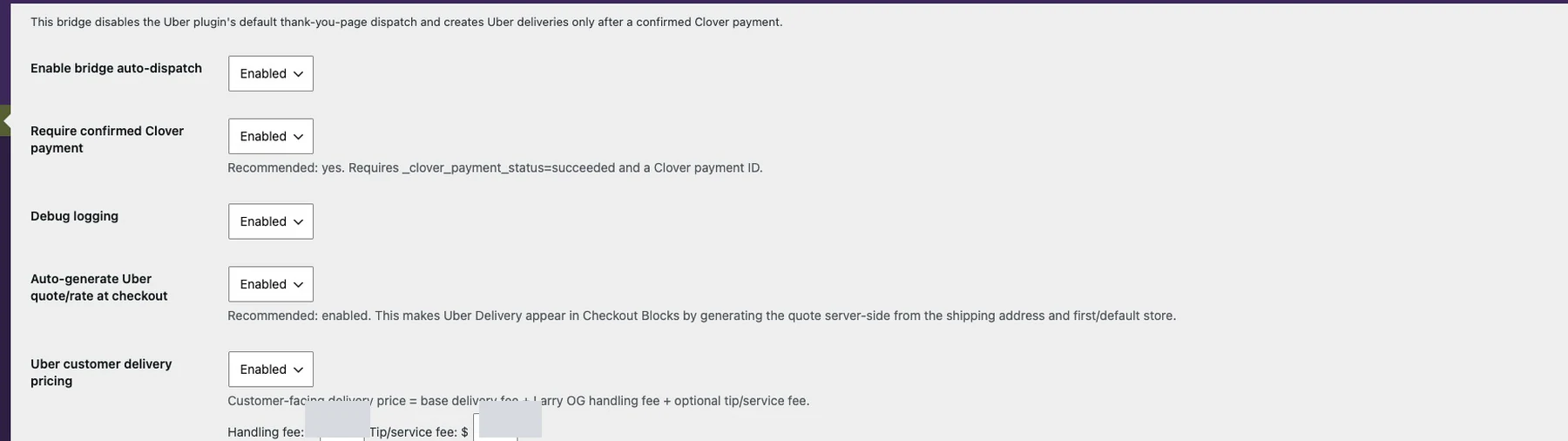
Coordinate WooCommerce delivery options and Uber Direct order workflows, with a configurable check for confirmed Clover payment before automatic dispatch.
Workflows
- Adds WooCommerce delivery-method and checkout support, saves delivery details to orders, and exposes manual dispatch and status-refresh actions.
- Hooks into WooCommerce payment and order-status events; when the Clover-payment requirement is enabled, source checks Clover payment state, a payment identifier, and WooCommerce paid status before dispatch.
- Registers a WordPress REST webhook route and signature-verification code for delivery status events.
- Skips automatic dispatch for existing deliveries and selected manual or extended-delivery modes.
Implementation
- Implemented as a separate WooCommerce plugin with settings, a shipping-method class, order metadata, lifecycle hooks, and a REST route.
- Declares WooCommerce and the third-party Uber Direct Integration plugin as dependencies.
Integrations
- WooCommerce checkout, shipping, payment, order lifecycle, and order records.
- Clover payment-state metadata.
- Third-party Uber Direct Integration plugin and Uber Direct service.
Scroll or swipe thumbnails to browse
05 / TECHNOLOGIES
Technology stack
- WordPress
- WooCommerce
- Eldy child theme
- PHP
- JavaScript
- CSS
- Clover Catalog API
- OpenAI Responses API
- Uber Direct
- WordPress REST API
06 / PROJECT NOTES
Approach & implementation
Storefront and child-theme approach
The storefront uses the Eldy parent theme with an Eldy child theme. The child theme enqueues its own larryog-style.css stylesheet and project JavaScript, keeping store-specific presentation and behavior in the child-theme layer rather than editing the parent theme.
The child stylesheet includes responsive media-query rules. Those rules are verified in source; their current rendered behavior has not been re-tested in this case-study pass.
Product archives and variation discovery
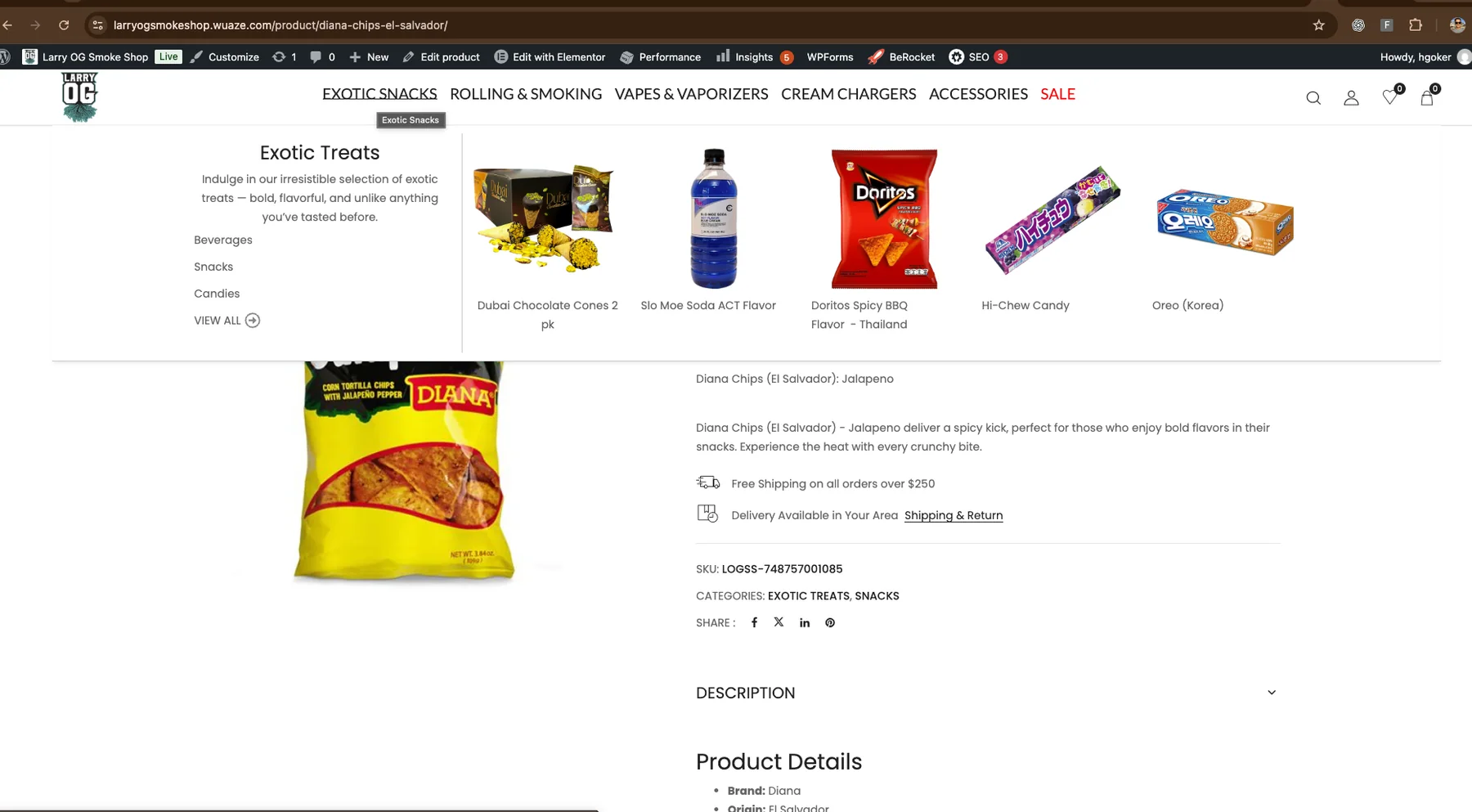
The child theme overrides WooCommerce product-loop output for grid and list layouts. The grid templates include WooCommerce product actions, price output, and stock or preorder labels. For variable products, a child-theme renderer reads purchasable variation attributes and uses an attribute-term image when available, falling back to the variation image. It deduplicates attribute terms and limits the visible set before adding a “more” link.
The qb-swap-image.js script listens for pointer interaction with variation thumbnails in product grids and swaps the card’s main image. This is an archive-card interaction; it does not establish that every product gallery or device interaction currently works as intended.
Variable-product presentation and WooCommerce templates
A child-theme filter changes variable-product price output by context: when a product has a price range, the single-product template omits the range while archives show a starting-price format. Products with a single shared variation price retain that price.
The child theme also supplies a WooCommerce variable add-to-cart override. It prepares variation descriptions for the page, caches that map in a WordPress transient, and provides selected-variation display elements alongside WooCommerce’s variation form and add-to-cart controls. WooCommerce remains responsible for product and variation records and the underlying cart behavior.
Other local overrides are present for product-loop cards, loop add-to-cart, the mini-cart, and checkout. Their presence is source evidence only; no checkout, payment, or current storefront runtime was exercised for this case study.
AI-powered WooCommerce content workflows
The local Larry OG source contains one separately installed plugin, QB AI Content Generator, with three merchant-facing workflow areas. They are modules of the same plugin rather than three separate plugin products. Together, the controls are intended to help a store operator work through product copy and media metadata in WooCommerce without treating every item as a bulk rewrite.
Product descriptions
The plugin adds controls to the WooCommerce product editor for generating a short description, a long description, or both. It also has a separate bulk content screen with a missing-content filter and batch controls. The merchant can preview generated copy without saving, fill empty fields only, replace selected fields, or preserve existing material while adding a managed SEO block. In append mode, an existing short description is kept; the long description can receive the managed block. Before a product-copy update, the source records the prior short and long descriptions in product metadata if a backup is not already present.
Variation descriptions
Variable products can be handled one at a time from the product editor or through the dedicated AI Variation Descriptions screen. The bulk workflow works through parent products and offers a filter for products with empty variation descriptions. Its controls include start/resume, stop, reset, batch progress, and a recent batch log. The available strategies fill empty descriptions, append a managed block while keeping existing text, or replace the description. Before changing variation text, the plugin stores a source-level backup in variation metadata and saves the result through WooCommerce, with a post-excerpt update intended to keep the editor and storefront variation data aligned.
Product-image metadata
The product editor and AI Image Metadata screen can generate attachment alt text, title, caption, and description using WooCommerce product context. A merchant can select the fields, target featured images, gallery images, or both, and run a bulk queue with saved progress. The “only fill currently empty fields” option skips populated selected fields. The inspected image-metadata path updates WordPress attachment metadata directly; the source does not show the same preview or backup behavior available for product copy, so those controls should be reviewed carefully before overwriting populated metadata.
Request and evidence boundaries
The plugin sends server-side requests to the OpenAI Responses API. Its default model is gpt-4o-mini; the source allows a QB_OPENAI_MODEL override and reads the API key from the server-side OPENAI_API_KEY constant. The bulk workflows persist resume state and progress in dedicated WordPress options. Their AJAX actions are registered for authenticated WordPress requests, and the inspected handlers include capability and nonce checks.
These are implementation details verified in the local plugin source and its README, not proof of a current live integration or a successful OpenAI run. No API request, generated output, bulk run, or production operation was tested for this case study. The plugin header identifies “QuikBooze / Larry OG”; it does not establish the individual contributor split for every module. The gallery now includes the owner-supplied storefront captures and the three plugin evidence galleries: AI Content Generator, CLOVER APPS / Clover Sync, and Uber Bridge. The 162-parent/624-variation figures mentioned in the brief are historical installation-specific values and are not presented as current counts or results.
Clover catalog work and payment boundary
CLOVER APPS is a custom administration plugin, separate from the Clover payment extension. Its source describes tools for comparing Clover catalog items with WooCommerce products and variations, previewing protected-category status changes, reviewing price updates, listing unmatched items, and filling missing WooCommerce SKUs after review.
The local installation also contains the third-party Clover Payments for WooCommerce plugin, whose header identifies Clover eCommerce as its author. That vendor plugin is distinct from CLOVER APPS. Neither the presence of the payment plugin nor the bridge’s source checks prove that a payment was processed or that catalog synchronization is currently working.
Uber Direct delivery coordination
Larry OG Uber Bridge connects WooCommerce checkout and order events to delivery workflows. Its source includes a WooCommerce shipping method, delivery-related order metadata, settings, manual order actions, and a REST webhook route with signature-verification code. Automatic dispatch is gated by order and delivery checks; the source’s Clover-payment guard requires an accepted Clover status, a payment identifier, and WooCommerce’s paid state when that setting is enabled.
The bridge declares the separate Uber Direct Integration plugin as a dependency. That plugin is third-party software, not custom Larry OG code, and its local source says it is no longer maintained or supported. No live Uber quote, dispatch, webhook, or delivery outcome is claimed here.
Project status and evidence boundary
The inspected child theme and plugin files show implemented source paths, but source presence does not prove that the current production storefront, AI requests, payment flow, Clover synchronization, or delivery operation is available. The project remains labelled In development. Supplied screenshots and inspected source document the work but do not establish current production or provider operation.
The public case study uses owner-supplied storefront and plugin-interface screenshots. Product and campaign artwork remains outside the gallery. No screenshots were fabricated. The portfolio owner authorized public presentation of these four related case studies on 2026-11-13. The screenshots document supplied interfaces and do not establish current storefront, payment, AI, Clover, or delivery runtime behavior.